
“Is it still working, or waiting for me?”
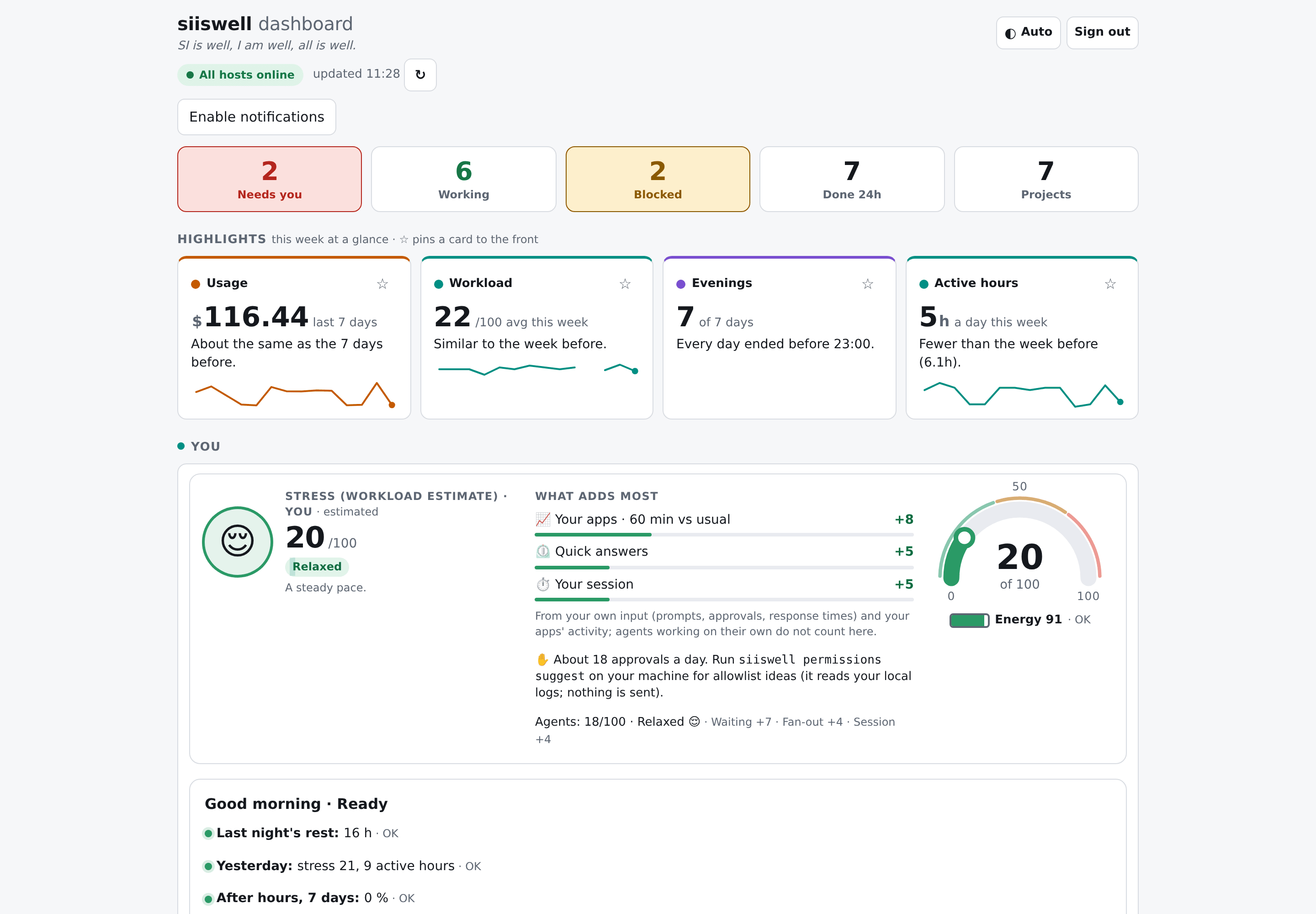
Needs you shows every task that is blocked or waiting for a permission — and your phone tells you the moment it happens.
Open source · Self-hosted · Zero AI calls
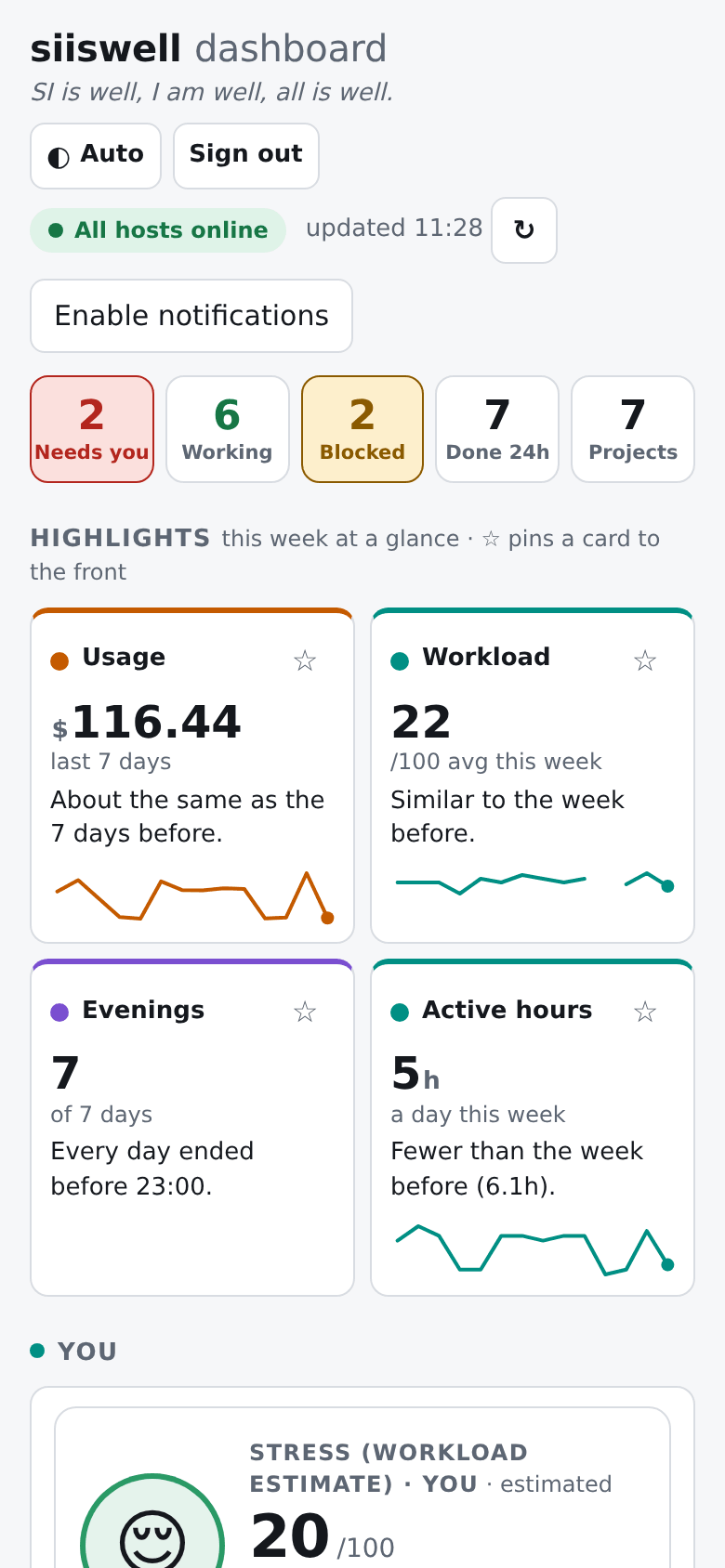
One calm page for what your AI coding agents are doing, what it costs you, and how you are doing — on your desk and on your phone.
SI = super intelligence: the AI agents working for you. Free and open source · self-hosted · for one person today, teams next
What is siiswell?
siiswell is a free, open-source, self-hosted dashboard for AI coding agents. It shows what agents such as Claude Code, Codex and Gemini CLI are working on, which tasks are waiting for you, how many LLM tokens they use and what that would cost on the API — and it keeps an eye on the person in the middle with calm, rule-based well-being signals.
Works with the agents you already use
Why siiswell
AI agents now run for minutes or hours on their own, several at once, across terminals, desktop apps, servers and CI. Great for throughput. Hard on the person in the middle.
“Is it still working, or waiting for me?”
Needs you shows every task that is blocked or waiting for a permission — and your phone tells you the moment it happens.
“My agents are everywhere.”
Laptop, server, desktop app, nightly script: one page for every machine, app and project.
“What did this month really cost?”
Token counts and the API-equivalent cost by day, hour, project and model — from your local logs.
“My phone buzzes all evening.”
Urgent things now, the rest in a summary. Quiet hours, Focus, and your calendar decide the rest.
“Long days creep up on me.”
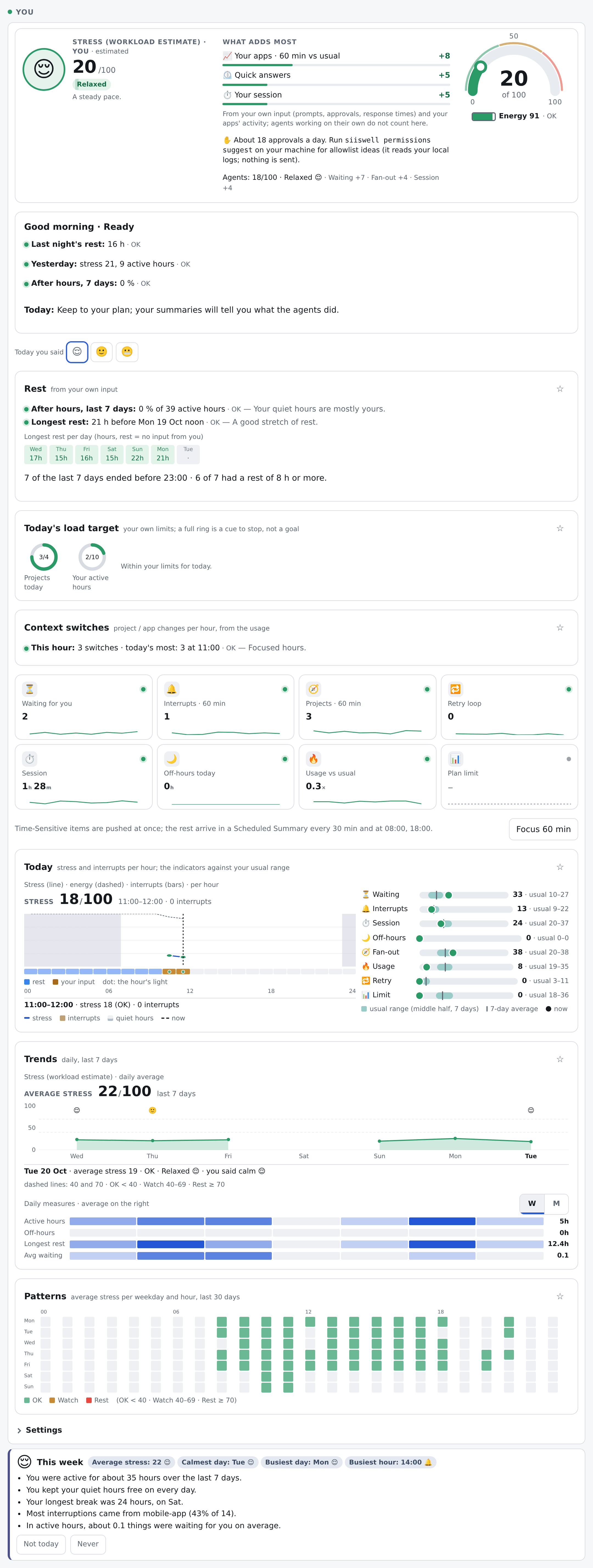
A gentle You card: how busy today really was, a nudge to take a break, a wind-down note. No scores.
“Can I trust another dashboard?”
It never sees prompts, code or files, never calls an AI model, and you host it.
How it works
report_task when it starts and update_task when it is blocked or done. Claude Code and Codex hooks add “waiting for you” by themselves.
Features
Needs you, Working now and Recent results. ETA, overdue markers, and stale tasks that tidy themselves up.
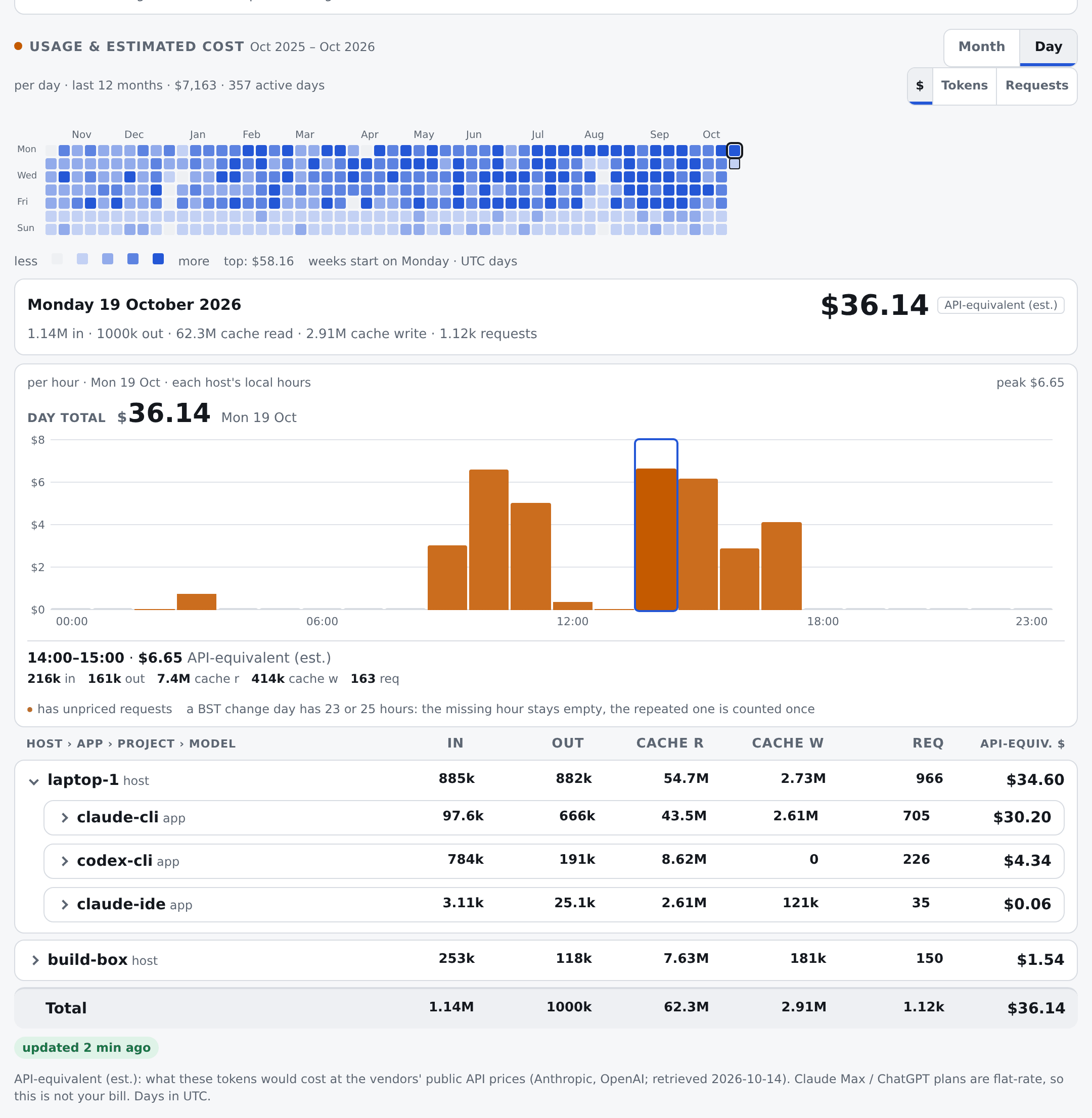
A 12-month calendar, any day's 24 hours, and tokens and API-equivalent cost by host, app, project and model.
Calm / Busy / Overloaded with the reasons, your usual range on every signal, gentle nudges you can switch off.
Time-Sensitive now, a Scheduled Summary later. Quiet hours, Focus 60 min, and Focus from your calendar.
No prompts, code or files. Project names hashed. Text scrubbed on your machine and again on the server.
One Docker container, or a Cloudflare Worker. A zero-dependency CLI that updates itself from your dashboard.
Highlights
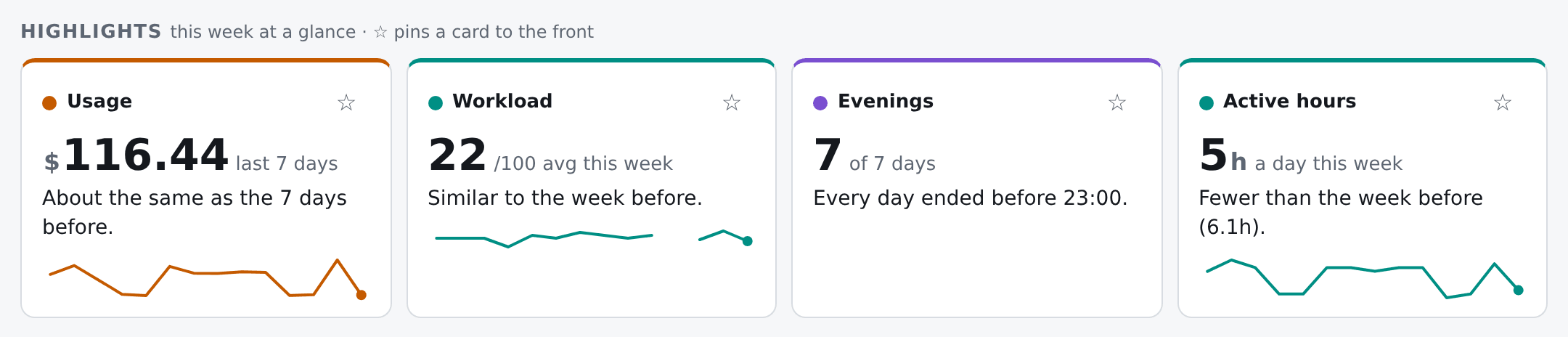
“About 12% less than the 7 days before.” “Every day ended before 23:00.” Big numbers, small units, one sparkline — in the spirit of the health apps you already know. Pin the cards you care about.
You
Usage & cost
Claude Code and Codex logs become hourly totals per model — numbers only. See what your work would cost on the API, by machine, app, project and model, even on a flat-rate plan.
Privacy
siiswell records that you and your agents did something — never what.
Get started
Recommended
A home server, a VPS or a NAS. Built-in sign-in with one password: set PUBLIC_URL and ADMIN_PASSWORD in .env before you start.
git clone https://github.com/jcaol/siiswell.git siiswell && cd siiswell
cp .env.example .env
docker compose up -d --build
For Workers users
A Worker and D1 in your own account, protected by Cloudflare Access.
bunx wrangler d1 create siiswell
bunx wrangler d1 migrations apply siiswell --remote
bun run deploy
On each computer
Installs the siiswell command, adds it to your agent apps, and can add the usage collector.
bun install && bun run build:cli
scripts/setup-client.sh
siiswell report "Hello, siiswell" --kind testing
The full guide — HTTPS, phone pushes, tokens, backups — is in the README on GitHub, in eight languages.
Open source
The server is AGPL-3.0, so improvements to a hosted siiswell stay open. The client is Apache-2.0, so it installs on any machine — including company laptops — without licence questions. A commercial licence is available for the server — ask us. Source code: github.com/jcaol/siiswell.
| Part | Licence |
|---|---|
| Server and web page | AGPL-3.0-only |
| CLI, bridge, shared client code | Apache-2.0 |
| Contributions | Contributor License Agreement |
| Commercial use without AGPL | Commercial licence |
FAQ
SI stands for super intelligence: the AI agents working for you. “SI is well” means your agents are running smoothly; “I am well” means you are not overloaded. siiswell watches both, so all is well.
siiswell's Claude Code hooks mark a session as “waiting for you” the moment it asks for a permission, list it under Needs you, and send a push to your phone — urgent items at once, everything else in a summary.
The siiswell usage collector reads the token counts in your local Claude Code and Codex logs (never their content) and shows tokens and API-equivalent cost by day, hour, machine, app, project and model.
Supervising several agents means constant context switching and quick approvals, and many developers report feeling drained by it. siiswell makes the load visible — active hours, quiet-hour work, response pace — batches notifications, and suggests breaks. It is not a medical tool.
No. Any agent that can use MCP tools can report tasks: add the server and a short rule to its instructions. Without MCP, the siiswell command or a plain HTTP call works too.
For task reporting, yes wherever the agent can add a remote MCP server with a bearer token. Usage and the “You” signals come from local logs and hooks, so they cover the agents on your own machines.
Barely. A report is a few hundred bytes, only for tasks longer than about ten minutes. Hooks return at once. siiswell itself never spends AI tokens.
It is the API-equivalent price: token counts times a per-model price table you can override. On a subscription it shows what the same work would cost on the API, not your bill.
No. It counts timestamps and events with fixed thresholds and says so on the page. It makes a long day visible; it does not judge it. Every nudge can be switched off.
Not if you mark its projects with a .siiswell-agents file (or start its agents with SIISWELL_AGENT=1). Only your own sessions count, and nothing is reported twice.
Today siiswell is built for one person: one installation, one owner. Team features — shared views of agents and LLM costs, with personal well-being data kept private to each person — are on the roadmap.
Nothing extra: one small container and a SQLite file, or a personal Cloudflare installation that stays well inside the free D1 limits.